Free room planner
Check if your furniture fits before you move it. Create a fast, measurement-accurate 2D layout with no 3D and without design elements. No signup and no installation required.
Best for:
- Checking if a bed, desk, or sofa fits
- Planning furniture layout with exact measurements
- Creating a simple 2D floor plan without 3D design tools
Simple, fast and free!
Trusted by students, renters, and homeowners
Everything you need to plan your space
Simple, powerful tools designed to make room planning effortless
Easy drag-and-drop
Intuitive interface that anyone can use. Simply drag furniture and walls into place.
Works everywhere
Fully responsive design. Plan your room on desktop, tablet, or mobile device.
No signup required
Start designing immediately. No account needed, no personal information collected.
Print your room
Print your room plan to take it with you to continue planning later.
How it works
Get started in three simple steps
Open the planner
Click the button to launch Simple Room Planner in your browser. No installation needed.
Draw your room
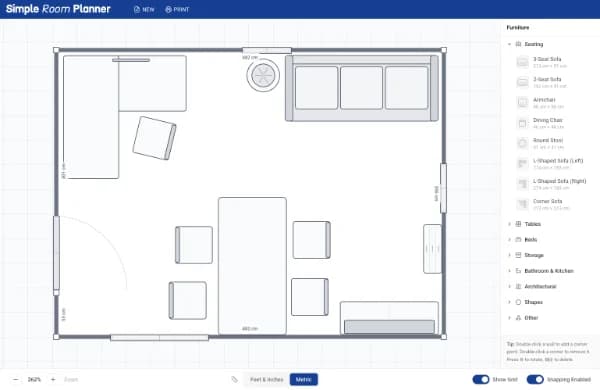
Define your room dimensions by drawing walls or entering measurements.
Arrange furniture
Drag and drop furniture items, adjust sizes, and create your perfect layout.
How the Simple Room Planner Helps You Design
Planning a room layout shouldn't require complex software or professional design skills. Our free online room planner is built to help homeowners, renters, and students visualize their living spaces in minutes. Whether you are moving into a new apartment, rearranging your current living room, or planning a home office renovation, our tool provides a streamlined interface to get the job done.
1. Define Your Space with Precision
Start by setting your room's dimensions. You can easily draw walls to match the exact footprint of your space. Accurate measurements are the foundation of a good floor plan, helping you avoid the common mistake of buying furniture that is too large for the room.
2. Custom Furniture Arrangement
Once your walls are set, browse our library of essential furniture items. From standard queen-sized beds and sectional sofas to desks and dining tables, you can drag and drop items directly onto your canvas. Every piece of furniture can be resized and rotated, allowing you to experiment with different flow patterns and traffic paths through the room.
3. Visualize and Export
The real value of a 2D floor plan is the ability to see "what if" scenarios without moving a single heavy box. Test if that new bookshelf will fit next to the window or if there is enough clearance for the door to swing open. Once you are satisfied with your design, you can print your progress or export your layout to PDF through your printer's "print to PDF" functionality, to refer to while you shop or move.
Frequently asked questions
Everything you need to know about Simple Room Planner
Yes, Simple Room Planner is completely free. There are no hidden fees, subscriptions, or premium features. You can create unlimited room plans at no cost.
No installation required. Simple Room Planner runs entirely in your web browser. Simply visit our website and start designing immediately.
Yes! Simple Room Planner works on smartphones and tablets. You can pan the canvas with one finger, pinch to zoom, and tap to select and drag furniture. For the most comfortable experience, we recommend using a tablet or desktop.
No, not at the moment. You can print your room plans instead. We will consider adding more functionalities later.
No account is necessary to use Simple Room Planner. You can start designing immediately without providing any personal information or signing up.
We provide a comprehensive library of common furniture items including beds, sofas, tables, chairs, and storage units. You can customize sizes and rotate items to fit your space.